WP Grid Builder
This doc covers how to use WP Grid Builder (WPGB) facets with Etch. It provides a generic workflow that applies to all facet types. We'll use Pagination as an example for you to follow along.
Quick start
- Create or configure a facet in WP Grid Builder.
- In your Etch loop’s query args, set
wp_grid_builderto a selector in the formwpgb-content-{your_selector}(example:wpgb-content-posts). - Add the same selector as a CSS class on the direct parent of your loop element.
- Use the same selector in the facet shortcode’s
gridattribute where you want the controls to appear.
That’s it. The selector links the facet to your loop and WPGB handles updating the loop via AJAX.
Prerequisites
- WP Grid Builder plugin installed and facets created as needed.
- An Etch loop configured for the content you want to filter/paginate.
- A unique selector value for each loop you want to control, which must be prefixed with
wpgb-content-, and the exact same value must be used in all three places: the query arg, the CSS class, and the shortcodegridattribute. It could be any string after the prefix, such aswpgb-content-posts,wpgb-content-archive, orwpgb-content-blog.
Setup steps
1) Create a facet in WPGB
- Go to WP Grid Builder → All Facets → Add New.
- Configure the facet’s type and options as needed.
2) Connect the facet to your Etch loop
In your loop’s query args, add an arg for 'wp_grid_builder' => 'wpgb-content-{your_selector}'
$query_args = [
  'post_type' => 'post',
  'posts_per_page' => $posts_per_page ?? 12,
  'post_status' => 'publish',
  'orderby' => 'date',
  'order' => 'DESC',
  'wp_grid_builder' => 'wpgb-content-1'
];
In your template, add the same value as a CSS class on the direct parent of your loop element:
<div class="results wpgb-content-1">
  {#loop yourLoopName as item}
    <!-- loop content -->
  {/loop}
</div>
Important: The selector can be anything you choose, but it must be prefixed with wpgb-content- and must match exactly across the query arg (wp_grid_builder), the CSS class, and the shortcode grid attribute. For example, if you use wpgb-content-posts, make sure to use wpgb-content-posts in all three places: the query arg, the CSS class, and the facet shortcode's grid attribute.
3) Output the facet UI
- Copy the facet’s shortcode from WPGB (in All Facets, open the item menu → Shortcode) and paste it where you want the controls to render. Add the
gridattribute to match the selector value you used above (wpgb-content-{your_selector}).
[wpgb_facet id="{your_facet_id}" grid="wpgb-content-{your_selector}"]
Concrete example: Pagination facet
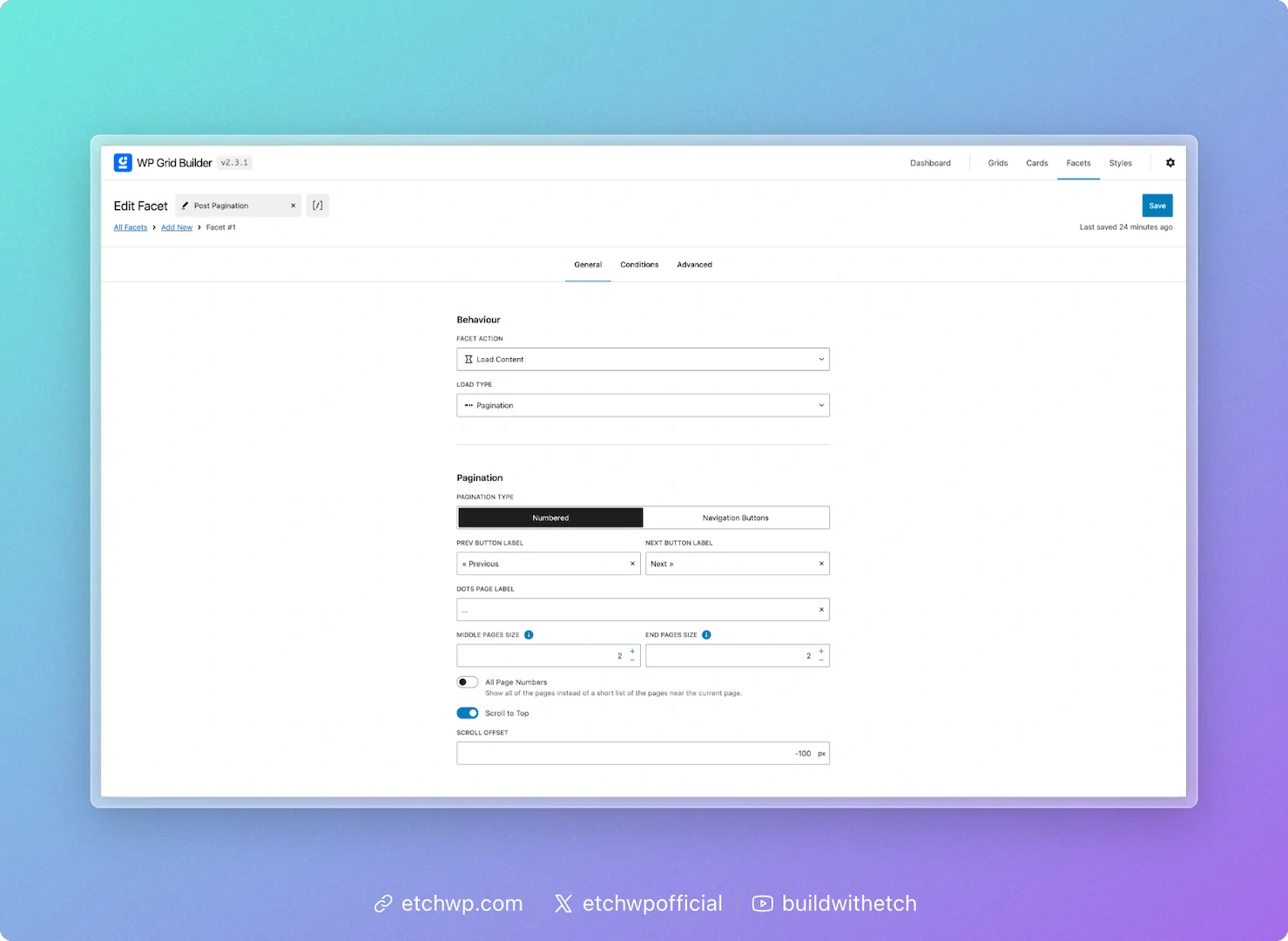
Pagination in WPGB is configured as a Load Content facet with a Pagination load type.
- In WPGB, create a facet:
- Facet Action: Load Content
- Load Type: Pagination
- Optional: enable Scroll to Top
- Set the Facet Slug and save
- Configure your Etch loop args (example):
$query_args = [
  'post_type' => 'post',
  'posts_per_page' => 10,
  'order' => 'DESC',
  'wp_grid_builder' => 'wpgb-content-1'
];
- Add the selector class to the parent of the loop element and place the shortcode below it:
<section data-etch-element="section">
  <div class="posts-grid wpgb-content-1">
    {#loop blogPosts as item}
      <article>
        {#if item.featuredImage}
          <img src="{item.featuredImage.url}" alt="{item.featuredImage.alt}" />
        {/if}
        <h2><a href="{item.permalink.relative}">{item.title}</a></h2>
        <p>{item.excerpt}</p>
      </article>
    {/loop}
  </div>

  [wpgb_facet id="your-facet-id" grid="wpgb-content-1"]
</section>
When users interact with the pagination controls, WPGB updates the loop content via AJAX and maintains URL state with the Facet Slug.
Using other facet types
The same connection pattern applies to most facet types (search, filters, sorting, reset):
- Create/configure the facet in WPGB.
- Ensure your Etch loop has a
wp_grid_builderselector value. - Add that class to the loop element's parent.
- Output each facet’s shortcode near the loop.
You can render multiple facets for the same loop; just make sure they all target the same selector value. If you have multiple independent loops on a page, give each loop a unique wpgb-content-* value and use separate facets/shortcodes per loop.
Multiple loops with their own facets
WP Grid Builder supports multiple loops on the same page, each with their own facets. Each loop should have its own unique wpgb-content-* selector value, and all three components (query arg, CSS class, shortcode grid attribute) must use the same value for that loop to work correctly.
Tips and best practices
- Use a clear naming convention for selector classes, e.g.,
wpgb-content-posts,wpgb-content-products. - Place the selector class on the direct parent element of the loop element (not the loop itself).
- Keep
posts_per_page(or your query limit) finite; pagination will be derived from this value. - Group your facet UI near the loop so users can easily discover controls.
- Test with multiple facets active to ensure the URL state and interactions behave as expected.
Troubleshooting
- Facet not affecting the loop: Verify the
wp_grid_buildervalue matches the class on the loop element's parent exactly. - Wrong content updating: Ensure each loop/facet group uses a unique selector value.
- No pagination: Confirm the loop has a finite
posts_per_pageand the facet is set to Load Content → Pagination. - Shortcode issues: Re-copy the shortcode from WPGB and ensure the
gridattribute matches yourwpgb-content-*selector value (e.g.,wpgb-content-posts).
References
WP Grid Builder guide: Filter custom queries: https://docs.wpgridbuilder.com/resources/guide-filter-custom-queries/